Showing posts with label tec. Show all posts

Sunday, September 28, 2014

Kd-tree implementation

 I have implemented my own kd-tree library based on Accelerating kd-tree searches for all k -nearest neighbours (pdf), compared the result with ANN to confirm that it outputs the correct result. It was surprising my implementation was several hundred times faster (below graph, for the same queries, ANN gets 14728 samples while my code gets 15). I still doubt if there's something wrong with my code or profiling because it's too fast even after considering the fact that my kd-tree is specialized in finding nearest *one* point and uses Eigen::Vector4f for SSE optimisation.


 I tested several sampling profiler: perf, gperftools, oprofile, codeXL.  It took some time for me to get the correct call graph. Many profilers output a call graph where malloc/new has no parent, probably because libstdc++ is not compiled with no-omit-frame-pointer and cannot find the caller function. Newer profilers such as recent perf and gperftools can handle it correctly. I couldn't though find a way to make perf report's "-G" option work when I took a profile with

perf record -call-graph dwarf ...

so I used gperftools for it (above graph). It still took a while until I found pprof's 'callgrind' option (kcachegrind) could not output the result correctly. 'web' worked fine.

Sunday, May 18, 2014

CPU/GPU memory abstraction

When you write a program that uses GPU (either CUDA of OpenCL), you may want to implement both CPU code and GPU code, and use only one of them depending on the user's choice. For this reason I wanted to know how to treat different kinds of memories generically, i.e. the way  to abstract host and device memory.

 The easiest one is to follow the approach of (or just use) Thrust. It has host_vector and device_vector which interfaces are quite similar to std::vector. When you have one of them, you can copy it to another with assignment. Host/device copy will be done automatically under the hood.

 I wanted another way of abstraction to debug the program easily. What interested me was to have a mechanism where input data was either in host or device memory, and the the code does not have to know where it is. After several try and error I implemented one like this;

template < typename T >
class Buffer
{
public:
    T* get(MemoryType mType);
    const T* get(MemoryType mType) const;
    void setClean(MemoryType mType, bool isClean=true);
    void sync(MemoryType mType) const;
    void allocate(MemoryType mType) const;
    void free(MemoryType mType);

private:
    mutable MemoryType m_cleanState; //Clean state. Bitwise OR of HOST and DEVICE.
    mutable void* m_addrs[2]; //Host and device.
};

It can have both host and device memory, and knows if the data stored in the host/device memory is up to date or not. If the one in the host memory is up to date and one in the device memory is not, it copies data from the host memory to the device by calling sync(DEVICE). if the device memory is already up to date, sync() does nothing.
 You can use this class like this,

someCalculationCpu(const Buffer < float > * input, Buffer < float > * output)
{
    input.sync(HOST);
    float* ip = input.get(HOST);
    float* op = output.get(HOST);
    op[0] = ip[0]; /*Do some calculation with CPU*/
    output.setClean(HOST); //Tell the buffer that the data stored in the device memory is up to date.
}

someCalculationGpu(const Buffer < float > * input, Buffer < float > * output)
{
    input.sync(DEVICE);
    float* ip = input.get(DEVICE);
    float* op = output.get(DEVICE);
    op[0] = ip[0]; /*Do some calculation with GPU*/
    output.setClean(DEVICE); //Tell the buffer that the data stored in the device memory is up to date.
}

anotherCalculationCpu(const Buffer < float > * input, Buffer < float > * output)
{
    /*Same style as someCalculationCpu() with another calculation.*/
}

anotherCalculationGpu(const Buffer < float > * input, Buffer < float > * output)
{
    /*Same style as someCalculationGpu() with another calculation.*/
}

Now the these are all valid,

   someCalculationCpu(input, output);
   anotherCalculationCpu(input, output);

   someCalculationCpu(input, output);
   anotherCalculationGpu(input, output);

   someCalculationGpu(input, output);
   anotherCalculationCpu(input, output);

   someCalculationGpu(input, output);
   anotherCalculationGpu(input, output);

I've already implemented so I'll keep using it but just wonder if there is already a tool or a way with Thrust. Please leave a comment if you know.

Sunday, November 7, 2010

Coq Proof Assistant

From the homepage.

Coq is a formal proof management system. It provides a formal language to write mathematical definitions, executable algorithms and theorems together with an environment for semi-interactive development of machine-checked proofs.
I studied basic symbolic logic to learn Coq, but its still very difficult. I still have no idea about correspondence between "A's type is B" and "A is a proof of B" (Curry–Howard correspondence).

Monday, January 4, 2010

Early preview(2)

My new visual programming environment.

- Macro (under developing)
- Node definition in Python (callback based)
- Code editor
- Node template
- Visual debugger (It's fun to see how node networks are working. I'll soon add a video on this entry)

See some brief descriptions here about the demo.
http://koichitamura.blogspot.com/2009/12/early-preview.html

(Please wait if an error occurs and couldn't see the movie until youtube finishes processing)

Thursday, September 24, 2009

What every programmer should know about memory

I started reading What every programmer should know about memory.
It's much more advanced than "L2 cache is 10 times faster than memory access" stuff.

Friday, August 28, 2009

How many outputs in a node, one or more?

That matters.

Tuesday, August 18, 2009

Fascinated in Qt

I just read some about Qt and soon started fascinated in it. Since the main part of Qt is GUI framework the functionalities Qt offers are roughly the same as wx, if there is on in wx, there's an equivalent in qt (roughly, again). What I am interested is its direct use of C++ methods in a simple and flexible way. wx has event objects, multiple 'bind' types and multiple macros to bind events to callbacks. Qt does it in only two macros, signal, slot, and one method QObject::connect(). It is easy to connect a single event to multiple callbacks, multiple events to a single callback, the programmer doesn't have to be aware of thread, It's so flexible that it can be used in many ways. I looked at Qt WebKit API and found Qt has excellently integrated WebKit, which would have been very difficult if there was no signal-slot mechanism flexibility. Since it doesn't restrict the number and types of arguments of the callbacks, it can be well used for callback type network programming.

I think there's one minor drawback. In wx, what and when wx emits an event is usually explicit in the document. In Qt, the user can easily emits an event so it is not as easy as wx (it's a trade-off). It is also explicit for the events Qt itself emits, but the information is scattered in the document. In wx there's little chance to miss an event type and timing being emit once you get used to reading the document. (if not, read through Event handling overview (Don't miss the difference of event propagation mechanism between command events and other) then 'Events' section of Classes by category. See what kind of events there are in wx, then read the 'Event handling' section of the document of specific window you use, such as wxTextCtrl.)

Thursday, July 2, 2009

Writing a technical document

When I write a technical document, I try to be careful to keep three things.

1) Do not use the term that hasn't been explained in the earlier pages.
I think this is a basic rule that every document must keep, but lots of them break it. I once read a document about a Python framework which uses a term "jelly" (is that case, it used the term in method names) with no explanation beforehand. It took me a long time until I know its meaning. I hoped if the writer had added just one line saying "jelly means serialize". (although the framework itself is very useful. Lots of its terms are named after a sandwich. You guess what it is? ;).

2) Do not try to explain two things at a time.
Human brains are not designed to think about two things at a time. When you explain recursive function call, don't take mandelbrot as an example. Think about an average reader and take an example that most reader is supposed to know.

3) "Make a list of stuffs to write, think about the explanation flow of the document".
I usually make a graph for 1) and 3), which has a set of circles, each circle contains one element of the list , and dependencies as arrows between the circles.

Tuesday, June 30, 2009

Playing .wav files on Windows, Mac, Linux

Playing .wav files in the current directory.

Windows


import glob, winsound, random
wavfiles = glob.glob("*.wav")
wavfile = random.choice(wavfiles)
while(True):
raw_input()
wavfile = random.choice(wavfiles)
winsound.PlaySound(wavfile, winsound.SND_FILENAME)

Mac (got the idea here)

from AppKit import NSSound
from time import sleep
import glob, random
wavfiles = glob.glob("*.wav")
while(True):
raw_input()
wavfile = random.choice(wavfiles)
s = NSSound.alloc()
s.initWithContentsOfFile_byReference_(wavfile, True)
s.play()
while s.isPlaying():
sleep(0.1)
s.stop()

Linux (needs play command)

import os, glob, random
wavfiles = glob.glob("*.wav")
wavfile = random.choice(wavfiles)
while(True):
raw_input()
wavfile = random.choice(wavfiles)
os.system("play -q " + wavfile)

Monday, June 29, 2009

pydoc look up command (Emacs)

Just add the following stuff in your .emacs.
and type Ctrl-h f at point where you want to look up pydoc.


;;----pydoc lookup----
(defun hohe2-lookup-pydoc ()
(interactive)
(let ((curpoint (point)) (prepoint) (postpoint) (cmd))
(save-excursion
(beginning-of-line)
(setq prepoint (buffer-substring (point) curpoint)))
(save-excursion
(end-of-line)
(setq postpoint (buffer-substring (point) curpoint)))
(if (string-match "[_a-z][_\\.0-9a-z]*$" prepoint)
(setq cmd (substring prepoint (match-beginning 0) (match-end 0))))
(if (string-match "^[_0-9a-z]*" postpoint)
(setq cmd (concat cmd (substring postpoint (match-beginning 0) (match-end 0)))))
(if (string= cmd "") nil
(let ((max-mini-window-height 0))
(shell-command (concat "pydoc " cmd))))))

(add-hook 'python-mode-hook
(lambda ()
(local-set-key (kbd "C-h f") 'hohe2-lookup-pydoc)))

I had been thinking that Python is a toy and the rest of the programming languages are all tools, but I realized Emacs Lisp is a toy too. I'm sure I'm reinventing a wheel. Don't worry!

Friday, June 26, 2009

Recursive directory search configuration for anything.el

Continued from the previous entry.
If the selected document is html (".html" or ".htm" case insensitive) it opens the document with w3m in a new frame, otherwise it just opens it normally as a text file in the current frame.


hohe2-anything-find.el


(require 'w3m)
(require 'anything-config)


;;;; Find


(defun hohe2-register-c-source-find (config-symbol title-name find-dir min-required-chars)
"Register a new find configuration"
(set config-symbol
(list
`(name . ,title-name)
`(candidates . (lambda ()
(apply 'start-process "find-process" nil
(list
"find"
,find-dir
"-iname"
(concat "*" anything-pattern "*"))
)))
'(type . findfile)
`(requires-pattern . ,min-required-chars)
'(delayed))
)
)


(defun hohe2-anything-html-open-method (c)
(select-window (frame-selected-window (make-frame)))
(w3m-browse-url (concat "file://" c)))

(defun hohe2-anything-default-open-method (c)
(let ((ext (file-name-extension c)))
(if ext
(if (member (downcase ext) '("html" "htm"))
(hohe2-anything-html-open-method c)
(find-file c)))))

(add-to-list 'anything-type-attributes
'(findfile (action
("Default" . hohe2-anything-default-open-method)
("Browse other window" . (lambda (c)
(hohe2-anything-html-open-method c)))
("Browse" . (lambda (c) (w3m-browse-url (concat "file://" c))))
("Browse with Firefox" . (lambda (c) (shell-command (concat "firefox file://" c))))
("Open as text" . find-file)
)))


(provide 'hohe2-anything-find)

anything.el for Maya document (continued)


For those who uses emacs for Maya programming :)

Internally it uses "find". It is not limited to Maya documents. you can search for documents in any directory (and its sub directories recursively).

Usage:
Type META-; (I made a shortcut that searches only Maya API documents)
See the movie in another blog entry.

Installation:
1) If you haven't installed anything.el install it.

2) Install w3m web browser for Emacs. I just executed


sudo yum install w3m-el

3) Add hohe2-anything-find.el in any directory.

4) Add this line to .emacs, (unless the directory path has been added already)

(add-to-list 'load-path "path/to/directory")
5) Add the following script to your .emacs file. (Change the paths to the document directories).

;;Additional anything config for Maya.
(hohe2-register-c-source-find
'hohe2-anything-c-source-find-mayaapi "Maya API" "/usr/autodesk/maya/docs/Maya8.5/en_US/API" 2)

(hohe2-register-c-source-find
'hohe2-anything-c-source-find-mayamel "Maya MEL" "/usr/autodesk/maya/docs/Maya8.5/en_US/Commands" 2)

(hohe2-register-c-source-find
'hohe2-anything-c-source-find-mayapython "Maya Python" "/usr/autodesk/maya/docs/Maya8.5/en_US/CommandsPython" 2)

(hohe2-register-c-source-find
'hohe2-anything-c-source-find-mayanode "Maya Node" "/usr/autodesk/maya/docs/Maya8.5/en_US/Nodes" 2)

(setq hohe2-anything-alternative-sources (list hohe2-anything-c-source-find-mayaapi
hohe2-anything-c-source-find-mayamel
hohe2-anything-c-source-find-mayapython
hohe2-anything-c-source-find-mayanode
))

(defun hohe2-anything-alternative ()
(interactive)
(anything hohe2-anything-alternative-sources);;)
)
(global-set-key (kbd "M-;") 'hohe2-anything-alternative)
6) Restart Emacs.

7) Enjoy programming if it works.

This is my development environment

2.6.29.4-167.fc11.i686.PAE #1 SMP Wed May 27 17:28:22 EDT 2009 i686 i686 i386 GNU/Linux
Gnome 2.26.2
GNU Emacs 22.3.1

No guarantee. Use it at your own risk.

hohe2-anything-find.el

(require 'w3m)
(require 'anything-config)


;;;; Find


(defun hohe2-register-c-source-find (config-symbol title-name find-dir min-required-chars)
"Register a new find configuration"
(set config-symbol
(list
`(name . ,title-name)
`(candidates . (lambda ()
(apply 'start-process "find-process" nil
(list
"find"
,find-dir
"-iname"
(concat "*" anything-pattern "*"))
)))
'(type . findfile)
`(requires-pattern . ,min-required-chars)
'(delayed))
)
)


(add-to-list 'anything-type-attributes
'(findfile (action
("Browse other window" . (lambda (c)
(select-window (frame-selected-window (make-frame)))
(w3m-browse-url (concat "file://" c))))
("Browse" . (lambda (c) (w3m-browse-url (concat "file://" c))))
("Browse with Firefox" . (lambda (c) (shell-command (concat "firefox file://" c))))
("Open as text" . find-file)
)))


(provide 'hohe2-anything-find)

Currently it assumes every document is HTML. I will modify the script so that it looks at the file extension to know how to open the file soon(er or later). If you modify part of the above code like this it opens the file as a text by default.
June 28 added. Done.

(add-to-list 'anything-type-attributes
'(findfile (action
("Open as text" . find-file)
("Browse other window" . (lambda (c)
(select-window (frame-selected-window (make-frame)))
(w3m-browse-url (concat "file://" c))))
("Browse" . (lambda (c) (w3m-browse-url (concat "file://" c))))
("Browse with Firefox" . (lambda (c) (shell-command (concat "firefox file://" c))))
)))

Thursday, June 25, 2009

anything.el for Maya document (under construction)

Currently making an anything.el configuration for Maya document.

Saturday, May 16, 2009

Emacs Lisp newbie

I studied (Emacs) Lisp a little bit and I got some concept of it. 'symbol' is one of them that fascinated me. It's like a Python variable, you can get its value by evaluating it, but it can also be stored in another symbol as a value. Interesting, isn't it?

While studying Lisp, I found there were some which didn't sound natural to me. 1) Dynamic scope is confusing. 2) I don't like macro. Though I understand the necessity of it, it can let you write a counter intuitive code too easily just like C. 3) And there are too many special forms, which doesn't look elegant. Do we really need setq? Maybe Having set is enough, isn't it?. Lisp is so different between variants (*) so I don't know if they are specific to Emacs lisp or common to all lisps.

(*)
They are so different that some variants have lazy evaluation and others don't!


I don't like a symbol having two values, function and value. A function is not just a value in Emacs Lisp and Common Lisp. Language designers are quite careful so there must be a reason but I don't know why they have made such a decision. In Scheme a function is just a value, which is not at all different from other values such as integer or string. If this type of simplicity is what Scheme attaches importance to, I prefer Scheme to Emacs Lisp. Simplicity rocks!

Now I can read the source code of basic Emacs major modes. But I'm still not good at writing a code yet (Is there a function in ELisp which is equivalent to range() in Python? I still don't know) I remember those days when I was a Python newbie.

If you are a Lisp master and notice I wrote something wrong please leave a comment.

Saturday, March 7, 2009

FUSE test implementation


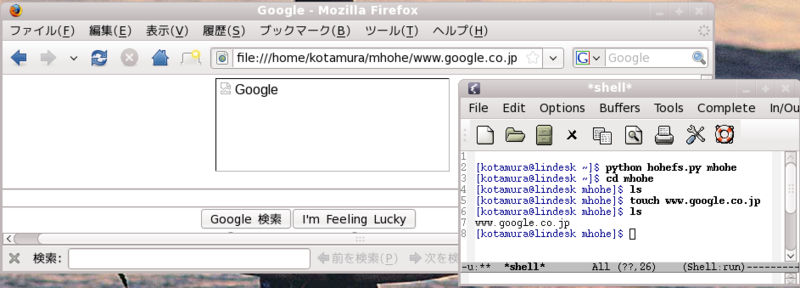
I made a test script with FusePython, referencing a couple of existing scripts (this one and this one). You can make a file e.g. www.google.co.jp and get the contents of the page from it. Internally it uses urllib2 module. Once it downloads the HTML it caches it in the memory.

To mount it,


python hohefs.py mountpoint

To unmount it,

fusermount -u mountpoint


It is not at all a good example. I just made it to see what it would be like to make a file system with FUSE. I didn't implement permission, I omitted lots of error checkings, and unlink equals to deleting a file, etc.etc.etc....

import fuse
from fuse import Fuse
from time import time
import sys
import urllib2

import stat # for file properties
import os # for filesystem modes (O_RDONLY, etc)
import errno # for error number codes (ENOENT, etc)
# - note: these must be returned as negatives

fuse.fuse_python_api = (0, 2)


class Mystdout():

def __init__(self, filename):
self.f = open(filename, 'w')

def write(self, text):
self.f.write(text)
self.f.flush()


class HoheStat(fuse.Stat):

def __init__(self):
self.st_mode = 0
self.st_ino = 0
self.st_dev = 0
self.st_nlink = 0
self.st_uid = 0
self.st_gid = 0
self.st_size = 0
self.st_atime = 0
self.st_mtime = 0
self.st_ctime = 0

def setStat(self, path):
st =os.stat(path)
self.st_mode = st[0]
self.st_ino = st[1]
self.st_dev = st[2]
self.st_nlink = st[3]
self.st_uid = st[4]
self.st_gid = st[5]
self.st_size = st[6]
self.st_atime = st[7]
self.st_mtime = st[8]
self.st_ctime = st[9]


class NullFS(Fuse):

def __init__(self, logfilename, mountpoint, *args, **kw):
Fuse.__init__(self, *args, **kw)
sys.stdout = Mystdout(logfilename)
self.__filestats = {}
s = self.__filestats['/'] = HoheStat()
s.setStat(mountpoint)
self.__docs ={}
print 'Init complete.'

def getattr(self, path):
print '*** getattr', path
return self.__filestats.get(path, -errno.ENOENT)

def readdir(self, path, offset):
print '*** readdir', path, offset
for r in self.__getFileNames(path) + ['.', '..']:
yield fuse.Direntry(r)

def getdir(self, path):
print '*** getdir', path
return map(lambda x: (x, 0), self.__getFileNames(path))

def mknod(self, path, mode, dev):
print '*** mknod', path, oct(mode), dev
st = HoheStat()
st.st_mode = stat.S_IFREG | mode
st.st_dev = dev
st.st_nlink = 1
st.st_size = 0
st.st_uid = os.getuid()
st.st_gid = os.getgid()
st.st_utime = time()
self.__filestats[path] = st

def utime (self, path, times):
print '*** utime', path, times
st = self.__filestats.get(path)
if st:
st.st_atime = times[0]
st.st_utime = times[1]

def read(self, path, length, offset):
print '*** read', path, length, offset
st = self.__filestats[path]
st.st_atime = time()
return self.__docs[path][offset:offset +length]

def open(self, path, flags):
print '*** open', path, flags
st = self.__filestats.get(path)
if not st:
return -errno.ENOENT

accmode = os.O_RDONLY | os.O_WRONLY | os.O_RDWR
if not (flags & accmode) in [os.O_RDONLY, os.O_WRONLY, os.O_RDWR]:
return -errno.EACCES

docs = self.__docs
if path in docs:
doc = docs[path]
else:
f = urllib2.urlopen("http:/" + path)
doc = f.read()
st.st_size = len(doc)
docs[path] = doc
#Oops I need to close f

def mkdir(self, path, mode):
print '*** mkdir', path, oct(mode)

st =self.__filestats.get(path)
if st:
return -errno.EEXIST

parentpath = os.path.dirname(path)
parentst = self.__filestats.get(parentpath)
if not parentst:
return -errno.ENOENT
if not parentst.st_mode & stat.S_IFDIR:
return -errno.ENOTDIR

st = HoheStat()
st.st_mode = stat.S_IFDIR | mode
st.st_dev = 0
st.st_nlink = 1
st.st_size = 0
st.st_uid = os.getuid()
st.st_gid = os.getgid()
st.st_utime = time()
self.__filestats[path] = st

def unlink(self, path):
print '*** unlink', path
if path in self.__filestats:
del self.__filestats[path]
docs =self.__docs
if path in docs:
del docs[path]
else:
return -errno.ENOENT

def rmdir(self, path):
print '*** rmdir', path
if self.__getFileNames(path):
return -errno.EEXIST
if path in self.__filestats:
del self.__filestats[path]
else:
return -errno.ENOENT

def rename(self, oldPath, newPath):
print '*** rename', oldPath, newPath
return -errno.ENOENT

def mythread(self):
print '*** mythread'
return -errno.ENOSYS

def chmod(self, path, mode):
print '*** chmod', path, oct(mode)
return -errno.ENOSYS

def chown(self, path, uid, gid):
print '*** chown', path, uid, gid
return -errno.ENOSYS

def fsync(self, path, isFsyncFile):
print '*** fsync', path, isFsyncFile
return -errno.ENOSYS

def link(self, targetPath, linkPath):
print '*** link', targetPath, linkPath
return -errno.ENOSYS

def readlink(self, path):
print '*** readlink', path
return -errno.ENOSYS

def release(self, path, flags):
print '*** release', path, flags
return 0
return -errno.ENOSYS

def statfs(self):
print '*** statfs'
return -errno.ENOSYS

def symlink(self, targetPath, linkPath):
print '*** symlink', targetPath, linkPath
return -errno.ENOSYS

def truncate(self, path, size):
print '*** truncate', path, size
return -errno.ENOSYS

def write(self, path, buf, offset):
print '*** write', path, buf, offset
return -errno.ENOSYS

def __getFileNames(self, currentpath):
filt = lambda(x): os.path.dirname(x) == currentpath
filesincurrent = filter(filt, self.__filestats)
if currentpath in filesincurrent:
filesincurrent.remove(currentpath)
return map(os.path.basename, filesincurrent)

if __name__ == '__main__':

usage="""
Userspace hello example

""" + Fuse.fusage

fs = NullFS(
"hohefs.log",
sys.argv[1],
version="%prog " + fuse.__version__,
usage=usage,
dash_s_do='setsingle')

fs.parse(values=fs, errex=1)
fs.main()

Thursday, March 5, 2009

Interested in FUSE

You can represent anything as a file system in FUSE(Filesystem in Userspace). For example you can make your own filesystem with which you can mount a Maya DAG tree to ~/mayadag. (mayadag is an empty directory) And you can enter the directory, rename the dag object or delete it in the unix shell, e.g. 'rm ~/mayadag/persp2' (I don't think it's useful though, it's just an example). I'll update this blog entry when I've made a test program. If FUSE is installed (probably it's installed already), you don't even need to be root to mount it, and you can write it in Python with FusePython :) Dokan is an equivalent for Windows.

Monday, February 9, 2009

Paco

Paco is a nice tool when you cannot depend software install on yum, aptitude, etc. It records what a 'make install' creates (files, dirs, sym links...). You can use it like


$ ./configure
$ make
$ sudo paco -D make install

If you want to uninstall it, you can delete all the files with a single command. You can use gui (called gpaco) as well if you like it. It doesn't see application dependencies (but Windows installer doesn't see it as well, does it?). I use this when I source bould a software. A friend of mine told me that he didn't need this because he installs everything in /usr/local/ but started feeling like using it after I told him that we don't install everything in /usr/local/, e.g. device drivers. Some applications create preference file/dir(s) in the home directory. You'll have no chance of making a garvage when you uninstall an application using this utility. Internally it uses LD_PRELOAD and hooks system calls.

By the way I don't do a lot of CG work recently. That's because I don't write technical stuffs a lot.